
How to Budget and Plan a PEO Exit in 12 Months

Leaving a PEO feels a lot like planning a cross-country move while your current landlord keeps raising the rent. You know you need to go. You're just not sure how much it'll cost, how long it'll take, or what might break along the way.
The good news: a PEO exit doesn't have to be chaotic. With a 12-month runway and a clear budget, you can unbundle your benefits infrastructure methodically—without disrupting payroll, botching open enrollment, or discovering surprise costs in month eleven.
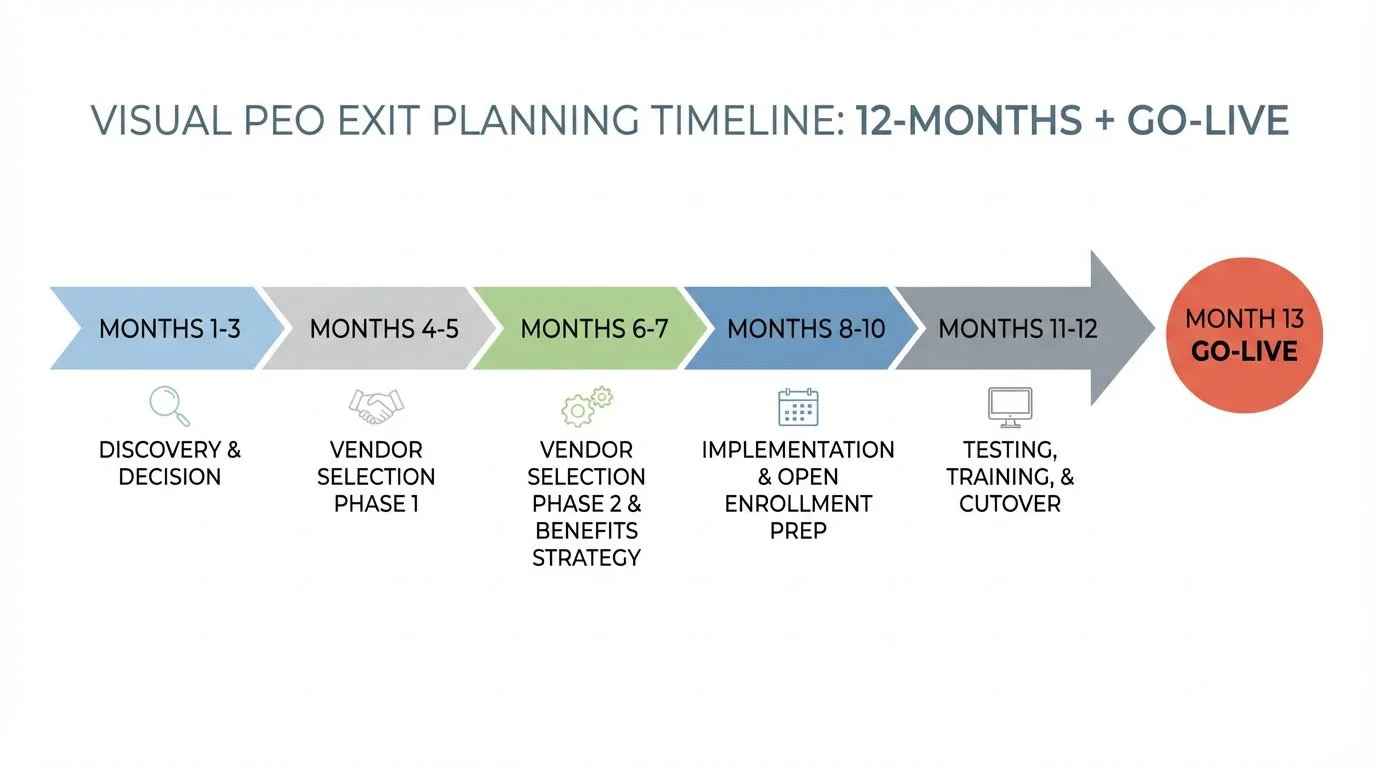
This guide breaks down a PEO exit into a month-by-month planning framework, including the hidden line items most companies miss, the timing dependencies that trip up even experienced HR teams, and the real-world pitfalls that turn "smooth transition" into "all-hands emergency."
Let's build your exit plan.
Why 12 Months? The Case for a Full-Year Runway
Most PEO exit advice says some version of "plan four to six months ahead." That's technically possible. It's also how you end up making rushed vendor decisions, scrambling during open enrollment, and paying for mistakes you didn't have time to catch.
A 12-month timeline gives you breathing room for three critical things:
Contract alignment: Your PEO contract, benefits renewal date, and fiscal year oftentimes fall on the same date.
. A full year lets you map these dependencies and avoid expensive mid-year resets.
Vendor vetting: Choosing an HRIS, a benefits broker, a retirement plan provider, and COBRA/FSA administrator takes longer than vendors promise. You'll want time for demos, references, data-transfer considerations, and negotiation.
Budget accuracy: The first budget you create will be wrong. A 12-month runway gives you time to refine it as you gather real quotes and uncover hidden costs.
One important note: if your PEO is a Certified Professional Employer Organization (CPEO), you may have more flexibility on timing because wage base resets mid-year won't affect your payroll tax credits [1]. If they're not certified, a mid-year exit could mean your employees restart their Social Security wage base—and you'll owe additional FICA taxes. Check your PEO's certification status before you lock in dates.
The Hidden Line Items Most Companies Miss
When companies budget for a PEO exit, they usually account for the obvious costs: new payroll, new benefits premiums, maybe an HRIS. But the hidden line items are where budgets blow up.
Here's what to include that you might not have on your radar:
HRIS/HCM Platform
Your PEO's technology is bundled into your service fee. Once you leave, you need your own system for payroll processing, time tracking, benefits enrollment, and reporting.
Typical cost range: Implementation fees generally run $5,000–$25,000 depending on company size and complexity. Ongoing costs typically fall between $5–$25 per employee per month (PEPM) for mid-market systems.
Hidden costs: Data migration fees, custom integrations with your accounting software, and training time for your team. Budget 20–40 hours of internal time for implementation oversight alone.
Benefits Broker
If you've been on a PEO's master health plan, you haven't needed your own broker. Now you do—someone to shop carriers, negotiate rates, and manage renewals going forward.
Typical cost range: Brokers are typically compensated through carrier commissions (built into your premiums), so you may not see a separate line item. Some charge advisory fees of $50–$150 PEPM for complex situations or fee-based arrangements.
Hidden costs: If your broker isn't strong on compliance, you may need separate legal review for plan documents—often $2,500–$7,500 depending on complexity.
COBRA Administration
Your PEO currently handles COBRA. Once you leave, you either need a third-party administrator (TPA) or you're managing compliance in-house.
Typical cost range: TPAs generally charge $5 - $15 per COBRA-eligible participant per month, or flat monthly fees starting around $50–$100/month for smaller employers.
Hidden costs: COBRA has tight notification deadlines (44 days for initial notice) and significant penalties for errors—up to $110 per day per affected individual. If you're doing this in-house, budget for legal review of your notices.
FSA/HSA Administration
Same story as COBRA—these are bundled in your PEO's fee until they aren't.
Typical cost range: Third-party administrators charge setup fees of $500–$1,500 plus $4–$6 PEPM for FSA administration. HSA administration is often included with your HSA custodian but may run $2–$5 PEPM separately.
Hidden costs: Mid-year transitions can create contribution tracking headaches. If you're switching administrators mid-plan-year, expect to spend time reconciling contribution limits and available balances.
Retirement Plan (401(k)) Provider
If your employees are on the PEO's retirement plan, you'll need to establish your own or find a new provider.
Typical cost range: Setup fees typically run $500–$2,000. Annual administration fees range from $1,500–$5,000 plus $30–$60 per participant annually, though bundled pricing varies widely.
Hidden costs: Plan-to-plan transfers can take 2–4 months. If you're mid-year, employees may face contribution limit complications if balances don't transfer cleanly. Budget for a few hours of CPA time to navigate the transition.
Workers' Compensation
Your PEO likely bundles workers' comp into your co-employment arrangement. You'll need your own policy.
Typical cost range: Premiums depend heavily on your industry, claims history, and payroll. As a rough guide, expect 1–3% of payroll for low-risk industries (office work, professional services) and potentially much higher for construction, manufacturing, or healthcare.
Hidden costs: If your claims history was pooled with the PEO's other clients, your standalone experience modification rate might be higher (or lower) than expected. Get quotes early—underwriting can take 3–4 weeks.
Compliance and Legal Review
State registrations, employment policies, handbook updates, benefits plan documents—all of this was partially managed by your PEO.
Typical cost range: Legal review for plan documents (SPDs, wrap documents) typically runs $2,500–$7,500. Handbook review or creation adds $1,500–$5,000. Multi-state registration assistance varies by state count.
Hidden costs: Multi-state compliance is complex. If you have employees in multiple states, budget $200–$500 per state for initial registration fees, plus ongoing compliance monitoring costs.
Internal Time and Opportunity Cost
This is the one everyone forgets. Your HR team (or you, if you're wearing that hat) will spend significant hours on this project.
Typical cost range: Assume 150–250 hours total from your project lead over 12 months, with heavier concentration in months 4–1. Add 30–50 hours each from finance and IT stakeholders.
To estimate your cost: multiply your HR lead's fully-loaded hourly rate by 200 hours. For a $75/hour fully-loaded cost, that's $15,000 in internal time alone.
Sample Budget: What a 75-Employee Company Might Expect
To make this concrete, here's a sample budget for a hypothetical 75-employee company leaving a PEO. Your numbers will vary based on your industry, location, current PEO costs, and specific needs—but this gives you a framework to build from.