
HCM vs HRIS vs HRMS: What They Mean and Why It Matters
Audio Overview:

You've probably noticed that vendors love their short-form initials if you've spent any time shopping for HR technology: HCM, HRIS, HRMS. These initials are sometimes used interchangeably, and oftentimes the vendors insist there's a crucial difference. The same vendor occasionally calls their product all three things on the same webpage.
Here’s the truth: these terms do have distinct meanings, but the industry has muddied them so thoroughly that you can’t rely on a vendor’s label to tell you what you’re actually buying. What matters isn’t the short-form on the brochure—it’s whether the system does what your company needs it to do right now, with room to grow.
HCM vs HRIS vs HRMS - The Short-form Initials Defined
Before we get into how to evaluate systems, here’s what these terms are supposed to mean:
HRIS: Human Resources Information System
An HRIS is fundamentally a database. It’s where you store and manage employee records—names, addresses, job titles, compensation history, benefits enrollments, and compliance documentation.
Think of it as the digital filing cabinet for your workforce. A solid HRIS handles:
Employee data management
Benefits administration and enrollment
Basic compliance tracking
Simple reporting
Time and attendance (often)
For many companies, especially those under 150 employees, an HRIS covers 80% of what you actually need from HR technology.
HRMS: Human Resources Management System
An HRMS includes everything an HRIS does, plus tools for managing the employee lifecycle more actively. The “management” in the name signals a broader scope.
Beyond core data storage, an HRMS typically adds:
Payroll processing
Recruiting and applicant tracking
Onboarding workflows
Performance management
Training and development tracking
If an HRIS is your filing cabinet, an HRMS is your filing cabinet plus a project management system for HR operations.
HCM: Human Capital Management
HCM is the broadest term. It encompasses HRIS and HRMS functionality while adding strategic workforce planning and talent optimization tools.
An HCM suite typically includes:
Everything in an HRIS and HRMS
Workforce planning and analytics
Succession planning
Compensation management and benchmarking
Learning management systems
Employee engagement tools
The philosophy behind HCM is that employees are assets to be strategically managed and developed—not just records to be stored. Whether you need that philosophy baked into your software is a different question.
Quick Reference
What You Need by Company Stage
Your HR technology requirements change as you grow. Here’s a realistic framework.
Under 75 Employees
You probably need an HRIS—possibly a simple one. At this stage, you’re solving for basics: keeping employee records organized, managing benefits enrollment without errors, and staying compliant. You might still be on a PEO, and that’s often fine.
Key questions: Does this integrate with our current payroll setup? Can we handle open enrollment without losing our minds? Is the compliance tracking actually useful or just checkbox theater?
75–250 Employees
This is where HRIS starts feeling cramped and HRMS becomes relevant. You’re likely hiring regularly, which means recruiting and onboarding tools save real time. Performance management becomes important as managers multiply. If you’re leaving a PEO, this is when you’re building your own benefits infrastructure and need technology that can handle it.
Key questions: How does this handle multi-state compliance? What does implementation look like when we’re also setting up new benefits carriers? Can we grow into more features without switching platforms?
250+ Employees
Now HCM-level functionality starts making sense—if you have the HR team to use it. Workforce planning, succession management, and advanced analytics become valuable when you have enough data to make them meaningful. You’re also more likely to have dedicated HR specialists who can actually leverage these tools.
Key questions: What does the analytics actually show us that we can act on? How does this support our compensation philosophy? What’s the total cost of ownership including implementation and ongoing administration?
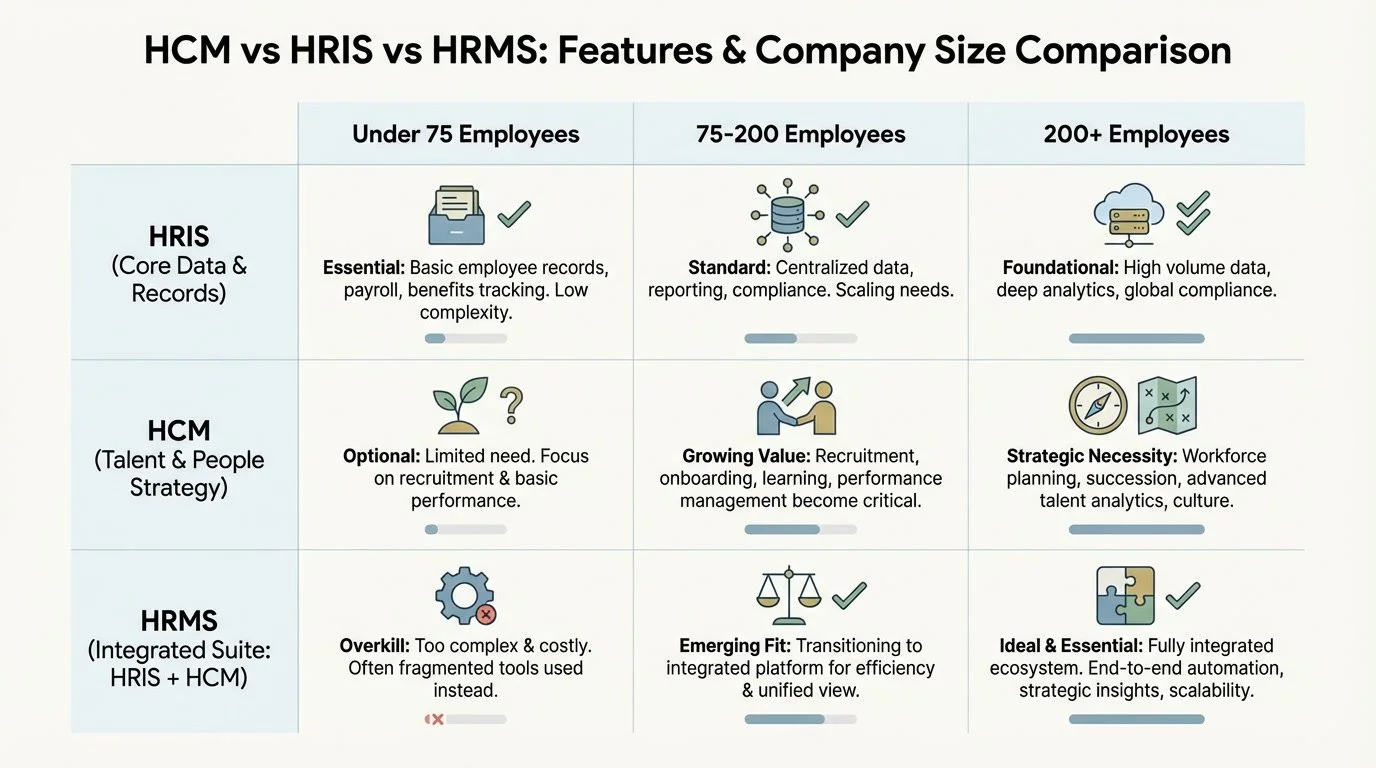
Match your HCM vs HRIS vs HRMS choice to your company's current size and HR team capacity.
Red Flags in the Buying Process
Watch for these warning signs when evaluating HR technology:
The demo is all sizzle. If they spend 45 minutes showing you the gorgeous dashboard and 3 minutes on data migration, ask more questions. Many HCM platforms bolt on functionality through acquisitions—the payroll module might not talk smoothly to the benefits module because they were different products three years ago.
They can’t explain pricing clearly. Vague answers about “it depends on your configuration” often mean surprise costs later. That affordable per-employee-per-month rate might double when you add the performance management module, or triple when you cross 100 employees. Get the full pricing model in writing.
They push you toward more than you need. A vendor who listens to your requirements and says “honestly, you don’t need our full suite” is rare and valuable. One who insists you need everything is trying to hit a quota.
Implementation is “their standard process.” Your company isn’t standard. You have specific workflows, data challenges, and timing constraints. When a vendor says “4–6 weeks,” ask what that assumes—does it include data migration, custom workflows, training? Usually it doesn’t.
They won’t let you talk to current customers. Reference calls matter. If they’re reluctant to connect you with similar-sized companies in your industry, wonder why.
You’re buying their roadmap blindly. HR tech vendors constantly add features and sunset others. A capability that’s core to your decision might be deprioritized next year. Ask about their product roadmap and how they handle feature changes.
The Infrastructure Question Most Companies Skip
Here’s what gets lost in the abreviation debate: your HR technology is only one piece of your benefits infrastructure.
The best HCM in the world won’t fix a broken broker relationship, unclear governance around benefits decisions, or misalignment between your benefits strategy and your company values. Technology can expose those problems faster—software doesn’t fix broken processes; it just makes them more visible.
Making the Decision

Before you invest heavily in HR technology, it’s worth asking whether you have the foundational pieces in place:
Do you know what you’re trying to achieve with your benefits program?
Is there a clear process for making benefits decisions?
Are your current vendors (broker, carriers, administrators) actually serving you well?
If you’re not sure, addressing those questions first often makes the technology decision much clearer.
Making the Decision
Once you’ve cut through the short-form fog, the actual decision comes down to this:
List your requirements in priority order. Be honest about what’s essential versus nice-to-have.
Get demos focused on your use cases. Don’t let vendors run their standard presentation. Give them scenarios and watch how the system handles them.
Understand total cost. Include implementation, training, ongoing administration time, and likely future modules.
Check integration reality. Talk to your payroll provider, benefits broker, and any other systems that need to connect. Confirm the integration works as advertised.
Plan for implementation. Build a realistic timeline that accounts for data cleanup, testing, training, and go-live support. If you’re also changing benefits or leaving a PEO, coordinate those timelines carefully.
Have a backup plan. Mergers and acquisitions in SaaS benefits-technology companies are common and can be extremely disruptive during implementation and integration. Companies quickly fall out of form, and the consumer feels the brunt of displaced employees. Identify who else will be on your “bench” during this time frame. If you are a HR-department-of-one, discuss with your broker the breadth of assistance they are able to provide. Typically brokers will not go beyond their scope of benefits-expertise during this process, so consider if you will need to outsource to fractional HR assistance ahead of time.
Bring Us Your Q
If you’re staring at vendor proposals and wondering whether you’re about to buy something that’s wrong for your company—or if you’re trying to figure out what you actually need before you start shopping—that’s exactly the kind of question we help with.
Q Benefits Administration provides impartial guidance on HR technology decisions, helping companies match their real requirements to the right solutions. No system is perfect, so it is important to identify which tech solutions meet the needs of your organization.
Request a Consult to talk through your options.
Frequently Asked Questions
How do I know if my current HR system is actually working?
Ask your HR team how much time they spend working around the system versus with it. If they’re exporting data to spreadsheets to get usable reports, manually re-entering information between modules, or dreading open enrollment because the system makes it harder—your technology isn’t serving you.
Should I choose HR technology before or after leaving a PEO?
You need to know your technology direction before you leave, since your exit timeline depends partly on implementation schedules. However, you don’t need the new system fully running first. Plan both transitions together with realistic timelines that account for data migration, benefits carrier setup, and training.
About Q Benefits Administration

Q Benefits Administration brings over a decade of experience in health and welfare benefits, HR technology, and mid-market consulting to every engagement. Founded by Cora Lynn Alvar (SHRM-CP), Q provides impartial, project-based expertise to help growing companies make smarter decisions about their benefits infrastructure—including health insurance plans, voluntary benefits, and the HR technology that supports it.
Works Cited
[1] SHRM — “Human Resource Information System (HRIS).” https://www.shrm.org/topics-tools/tools/hr-glossary/human-resource-information-system-hris
[2] Gartner — “Human Resources Management System (HRMS).” https://www.gartner.com/en/human-resources/glossary/hrms-human-resources-management-system
[3] Oracle — “What is Human Capital Management (HCM)?” https://www.oracle.com/human-capital-management/what-is-hcm/
